Image Processing with Python and the Convolution Theorem
From the archive (2024). Corrected in October 2026; see the note at the end.
Convolution is the basic operation behind blurring, sharpening and edge detection in image processing. 3Blue1Brown explains the mathematics and intuition beautifully:
The convolution theorem
The convolution theorem states that the Fourier transform turns convolution into multiplication:
\[\mathcal{F}[f \ast g]=F \cdot G .\]This gives a fast way to compute large convolutions: Fourier transform \(f\) and \(g\), multiply the transforms, and apply the inverse Fourier transform to the product.
Blurring and edge detection
I wrote a Python program that convolves an input image with an arbitrary kernel. (Image source.)
With a box-blur kernel, a \(50 \times 50\) array of ones normalised to sum to \(1\):
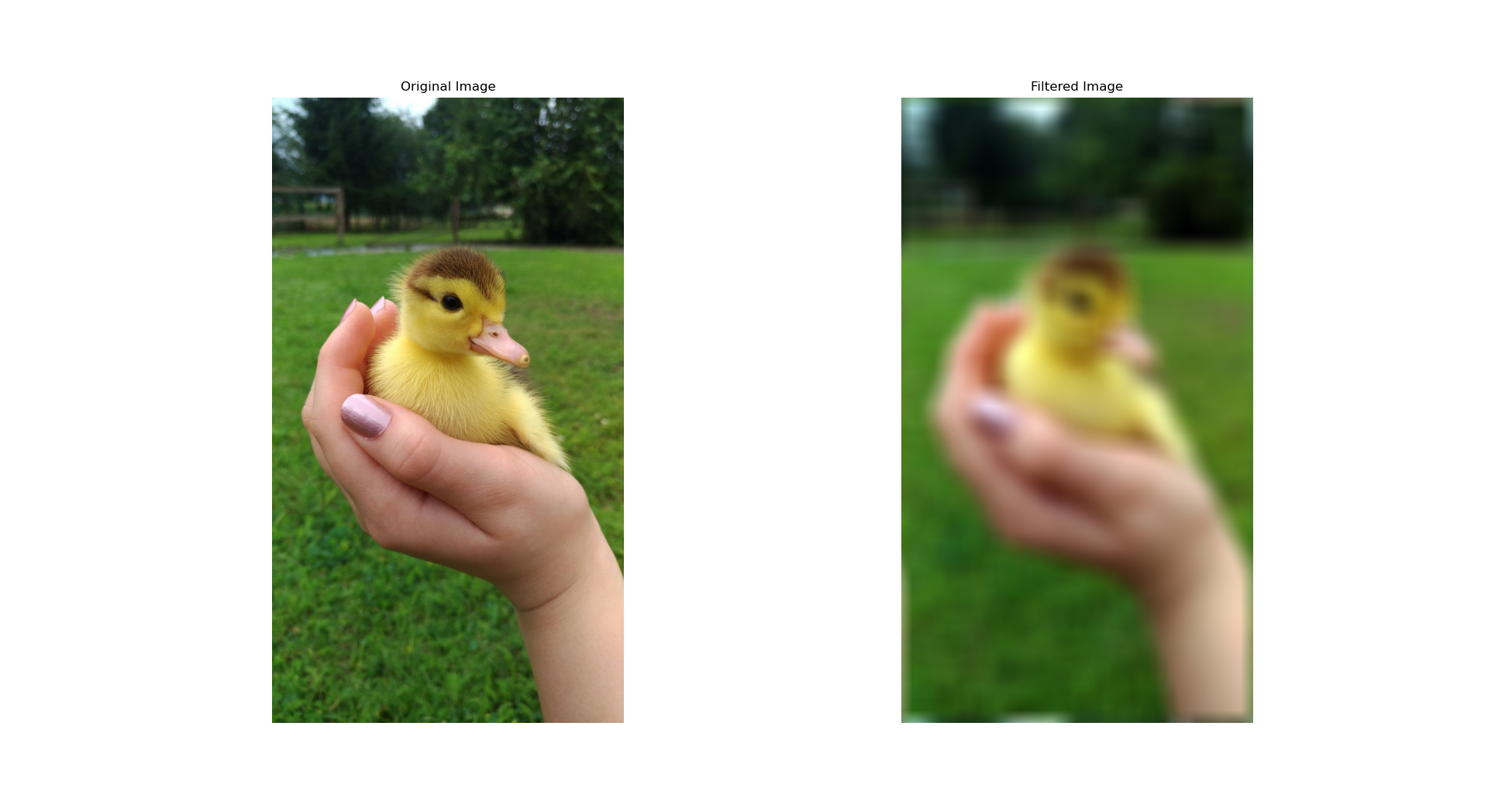
With the Sobel kernel, which approximates the horizontal derivative of the image and so highlights vertical edges:
\[\begin{bmatrix} -1 & 0 & 1 \\ -2 & 0 & 2 \\ -1 & 0 & 1 \end{bmatrix}\]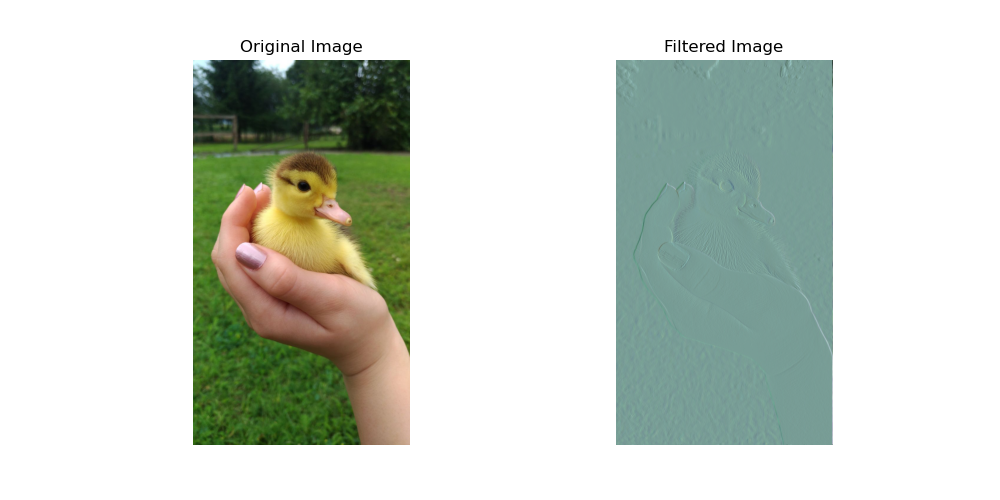
The code
The steps follow the convolution theorem. The key is to filter each colour channel separately and recombine the channels at the end.
import numpy as np
import matplotlib.pyplot as plt
import imageio.v2 as imageio
from scipy.fftpack import fftn, ifftn, fftshift

def read_scalars_from_file(filename):
    """
    Read the nine entries of a 3x3 kernel from a file.

    Parameters:
    - filename (str): file containing nine numbers on one line, row by row,
      e.g. "1 0 0 0 1 0 0 0 1".

    Returns:
    - scalars (list): the nine entries as floats.
    """
    with open(filename, 'r') as file:
        for line in file:
            lst = line.strip().split()
            scalars = list(map(float, lst))
    if len(scalars) != 9:
        raise ValueError("Enter the nine kernel entries row by row, separated by spaces, "
                         "e.g. 1 0 0 0 1 0 0 0 1. Only 3x3 kernels are supported.")
    return scalars

scalars = read_scalars_from_file('scalars.txt')

def custom_filter():
    """
    Returns:
    - filt (numpy.ndarray): the 3x3 kernel read from the file.
    """
    filt = np.array(scalars).reshape((3, 3))
    # For box blurring, use instead:
    # filt = np.ones((50, 50)) / 2500
    return filt

def apply_filter_to_channel(channel, filt):
    pad_height = (channel.shape[0] - filt.shape[0]) // 2
    pad_width = (channel.shape[1] - filt.shape[1]) // 2
    filt_pad = np.pad(filt, ((pad_height, channel.shape[0] - filt.shape[0] - pad_height),
                             (pad_width, channel.shape[1] - filt.shape[1] - pad_width)),
                      mode='constant')

    F = fftn(channel)
    H = fftn(fftshift(filt_pad))  # centre the padded kernel before transforming

    # Multiply in the frequency domain, then transform back
    g = ifftn(F * H).real

    # Normalise the result for display
    g -= g.min()
    g /= g.max()
    return g

image = imageio.imread("duc.jpg")

# Filter the red, green and blue channels separately, then recombine them
red_channel = image[:, :, 0]
green_channel = image[:, :, 1]
blue_channel = image[:, :, 2]

kernel = custom_filter()
red_filtered = apply_filter_to_channel(red_channel, kernel)
green_filtered = apply_filter_to_channel(green_channel, kernel)
blue_filtered = apply_filter_to_channel(blue_channel, kernel)

filtered_image = np.stack((red_filtered, green_filtered, blue_filtered), axis=-1)

# Show the original and filtered images side by side
fig, axs = plt.subplots(1, 2, figsize=(10, 5))
axs[0].imshow(image)
axs[0].set_title('Original Image')
axs[0].axis('off')
axs[1].imshow(filtered_image)
axs[1].set_title('Filtered Image')
axs[1].axis('off')
plt.show()
The fast Fourier transform
The code relies on the fast Fourier transform (FFT), which computes a discrete Fourier transform of \(n\) points in \(O(n \log n)\) operations instead of \(O(n^2)\). The most widely used FFT is the Cooley–Tukey algorithm; a worked example is in my other post.
Changes on 25 October 2026
What was wrong. Nothing in the content.
What changed. The introduction is rewritten, the notation is simpler and the video is embedded properly. Previously titled “Image Processing using Python and Convolution Theorem”.